When you take a brand new combi drill out of its case, you will notice switches and various controls. Between the numbered ring, the gear switch on top, and the mode icons on the side, it’s easy to wonder why all of those are there.
Most beginners default to leaving their drill on a random setting for every job. But taking 60 seconds to understand what these controls actually do will instantly stop you from stripping screws, chewing up wood, or burning out drill bits.
This guide breaks down the three main controls on your combi drill into plain, simple English so you can set up your tool like a pro every time.
Real-World Lesson: Meeting Other DIYers
I help out from time to time in “A Men’s Shed organisation.” Everyone one of them have used a drill. A large percentage of them had no clue what these numbers were actually for. Once they understood what they were for, it helped them use their drill properly.
The 3 Key Controls on Your Combi Drill
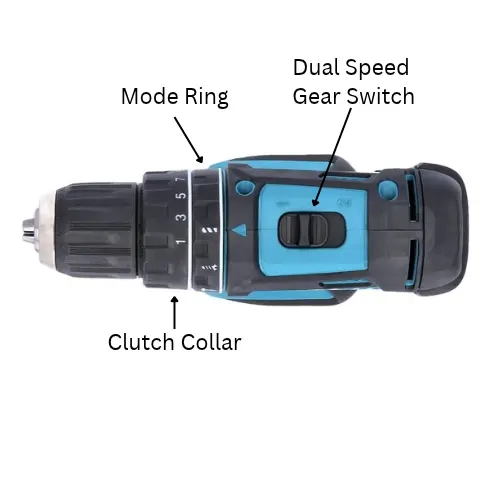
Every standard combi drill, whether it’s a DeWalt, Makita, Ryobi, or Bosch, has adjustment controls:
1. The Mode Selector (How Your Drill Switches Jobs)
Depending on the brand of combi drill you own, your mode controls will have one of two designs:
Design A: Combined Torque & Mode Ring (e.g. DeWalt)
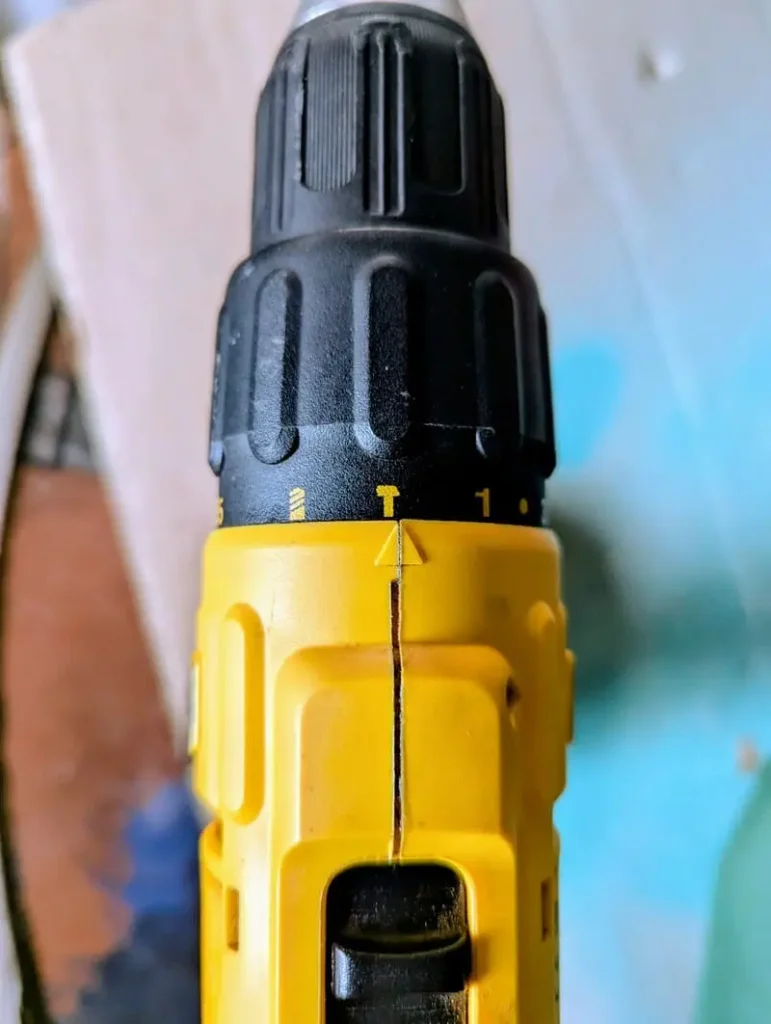
If you own an 18V DeWalt (like my DCD776), you have a single collar behind the chuck that handles both torque and modes:
- Numbers 1 to 15: This is your Screwdriving Mode. Selecting a number engages the internal clutch at that specific force level.
- Drill Icon: Turns off the clutch for Standard Drilling Mode (100% continuous power for wood, metal, and plastic).
- Hammer Icon: Turns off the clutch and turns on the percussive hammer mechanism for Masonry Mode (brick and blockwork).
Design B: Separate Mode Ring (e.g. Ryobi, Stanley, Makita)
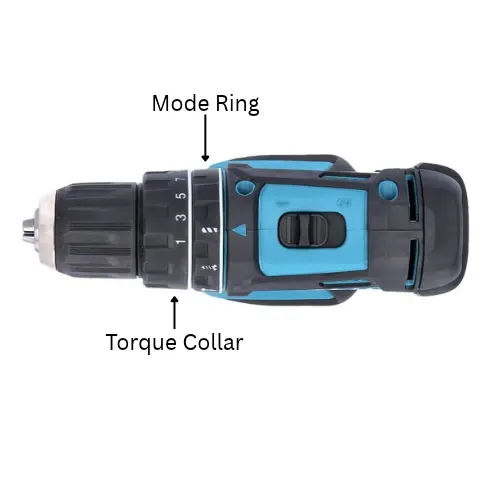
Other brands use two separate rings right behind the chuck:
- Ring 1 (Mode Selector): Features a Screwdriver Icon, Drill Icon, and Hammer Icon.
- Ring 2 (Torque Collar): Features numbers 1 to 20+. When you select the Screwdriver Icon on Ring 1, Ring 2 controls how much force is used before slipping.
Key Takeaway: Regardless of whether your drill has one ring or two, selecting any number (1–15+) puts your drill into Screwdriving Mode. Selecting the Drill or Hammer icons completely bypasses the numbers so you get full motor power!
Screwdriver Icon (Screwdriving Mode)
- What it does: Engages the numbered torque clutch ring.
- When to use it: Whenever you are driving screws into wood, plasterboard, or flat-pack furniture.
- Why it matters: It prevents you from driving screws too deep, stripping screw heads, or cracking fragile materials like particle board.
Drill Bit Icon (Standard Drilling Mode)
- What it does: Locks out the torque clutch completely, giving you 100% continuous turning power.
- When to use it: Drilling holes into timber, MDF, metal, plastic, or tile.
- Why it matters: If you try to drill a hole in wood while in screwdriving mode, the clutch will slip and rattle before you get through the timber!
Hammer Icon (Masonry Mode)
- What it does: Activates internal mechanical cams that rapidly strike the back of the chuck thousands of times per minute as it spins.
- When to use it: Only when drilling into UK red brick, mortar joints, breeze blocks, stone, or concrete using a masonry bit.
- Why it matters: Standard rotary drilling won’t bite into brick. The percussive hammer pulses crush the stone so the bit can clear the dust and bore a hole.
⚠️ Warning: Never use Hammer Mode on wood, metal, or plasterboard! It will tear up timber fibers and shatter plasterboard faces.
2. The Numbered Torque Collar (1 to 15+)
The numbered ring behind the chuck is called the clutch collar. (Torque collar) It controls how much twisting force (torque) the drill applies before it automatically stops spinning and makes a loud clack-clack-clack ratcheting noise.
Think of torque as “stopping power”:
- Low Settings (1 – 4): Light force. Perfect for assembling flat-pack furniture, fixing cabinet hinges, driving short screws into soft pine, or working with plasterboard.
- Medium Settings (5 – 10): Medium force. Ideal for driving general wood screws (4.0mm / No. 8) into stud walls, skirting boards, or timber frames.
- High Settings (11 – 15+): High force. Best for driving long screws into hardwoods, heavy structural timber, or outdoor fencing.
Pro Tip: Always start on a lower torque setting than you think you need. If the screw stops before it’s flush, turn the collar up 2 or 3 numbers and try again.
The basic rule to memorise is incredibly simple: Low numbers equal low twisting power. High numbers equal high twisting power.
3. Dual-Speed Gears (Switch 1 & 2 on Top)
On top of your drill body, you’ll find a sliding switch marked 1 and 2. This functions just like the gearbox in a car:
- Gear 1 (Low Speed / High Power): Spins the chuck slower (0–450 RPM) but delivers maximum twisting power.
- Best for: Driving screws with control, using large spade bits in timber, or mixing paint/plaster.
- Gear 2 (High Speed / Lower Power): Spins the chuck fast (0–1,500+ RPM) for smooth, quick cutting.
- Best for: Drilling standard holes in wood, metal, or masonry.
Quick-Reference Setting Cheat Sheet
| Job / Material | Mode Setting | Gear Switch | Torque Setting |
| Driving small screws / Flat-pack | Screwdriver (1-3) | Gear 1 | Low (1–3) |
| Driving long timber screws | Screwdriver (10-15) | Gear 1 | High (10-15) |
| Drilling wood with a twist bit | Drill Icon | Gear 2 | Irrelevant (Clutch bypassed) |
| Drilling metal / HSS bits | Drill Icon | Gear 1 | Irrelevant (Clutch bypassed) |
| Drilling brick walls | Hammer Icon | Gear 2 | Irrelevant (Clutch bypassed) |
Real-World Example: Setting Up A Ryobi or Makita for Common Jobs
Here is how you can quickly dial in settings on most combi drills for three typical DIY scenarios around the house:
Scenario A: Assembling Flat-Pack Wardrobes
- Mode: Screwdriver Icon
- Torque Ring: Set to 3 (low resistance so it won’t strip soft MDF)
- Gear Switch: Gear 1 (low speed for maximum trigger control)
Scenario B: Drilling a 6mm Hole into Red Brick for a Shelf
- Mode: Hammer Icon
- Torque Ring: Bypassed automatically in Hammer Mode
- Gear Switch: Gear 2 (high speed so the masonry bit cuts cleanly)
Scenario C: Driving a 50mm Screw into a Timber Batten
- Mode: Screwdriver Icon
- Torque Ring: Set to 8 – 10 (medium resistance to pull the timber tight)
- Gear Switch: Gear 1 (high driving power without stripping the screw head)
Real-World Example: Setting Up My DeWalt for Common Jobs
Here is how I quickly dial in settings on my 18V DeWalt combi drill for three typical DIY scenarios around the house:
Scenario A: Assembling Flat-Pack Wardrobes
- Torque Ring: Set to 3 (low resistance so it won’t strip soft MDF)
- Gear Switch: Gear 1 (low speed for maximum trigger control)
Scenario B: Drilling a 6mm Hole into Red Brick for a Shelf
- Torque Ring: Set to Hammer Icon
- Gear Switch: Gear 2 (high speed so the masonry bit cuts cleanly)
Scenario C: Driving a 50mm Screw into a Timber Batten
- Torque Ring: Set to 8 – 10 (medium resistance to pull the timber tight)
- Gear Switch: Gear 1 (high driving power without stripping the screw head)
A Quick Mention on Variable Speed
The trigger on your drill controls how fast your drill spins. The more you squeeze the faster it goes. My advice is always start slowly when drilling or driving as having full control at the beginning stops you from making mistakes. Once you have started drilling or driving then it is safe to speed up.
Frequently Asked Questions
Why does my drill make a loud clicking noise when I’m driving a screw?
Don’t panic! That loud ratcheting sound means your torque clutch has reached its limit and disengaged to protect your screw head and wood. If the screw isn’t deep enough yet, simply turn the numbered collar up to a higher number.
Can I change gears while pulling the trigger?
No. Always let the motor come to a complete stop before sliding the gear switch between 1 and 2. Changing gears while the chuck is spinning can damage the internal gears.
Do I use the torque ring when drilling holes in brick?
No. When you click your mode ring over to Hammer Mode (or Drill Mode), the torque clutch is automatically locked out so the drill can deliver 100% of its power directly to the drill bit.
Next Steps & Related Guides
This article is part of our [Ultimate Beginner’s Guide to Combi Drills]. Explore more of our hands-on guides below:
- [Combi Drill vs Drill Driver vs Impact Driver: What’s the Difference?]
- [Wall Plugs & Bit Sizing: How to Match Drill Bit, Plug, and Screw]
- [How to Use a Keyless Chuck (Inserting & Removing Bits Securely)]