
The DeWalt DCB113 is the standard charger included in many UK 18V XR starter kits, including those featuring the DCD776 cordless drill and DCF787N impact driver. This charger is a reliable unit, but like any electronic device, it has its little quirks.
If you’ve plugged in your battery and the light is flashing something other than the steady charging red, you shouldn’t panic. In 90% of cases, the solution is straightforward and requires no replacement parts.
This guide breaks down every light sequence on your DCB113, explains the common faults, and walks you through the easy fixes, saving you a trip to Screwfix or Toolstation.
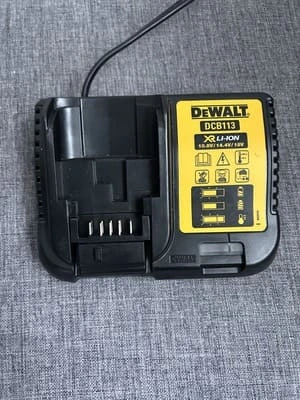
Decoding the DCB113 Charger Lights
The most crucial step is understanding the signal the charger is sending. The DCB113 charger uses a combination of Red (R) and Yellow/Amber (Y) lights to communicate status. We have explained that just below.
Light Sequence | Status Code | What It Means |
|---|---|---|
Red Light Flashing (Steady Pace) | Charging | Normal Operation. The battery is actively being charged. Leave it alone until the light changes. |
Solid Red Light | Charging Complete | Full Charge. The battery is fully charged and ready for use. It’s safe to leave it here. |
Red Light Flashing + Solid Yellow Light | Temperature Fault | Too Hot or Too Cold. The battery is outside the safe temperature range (usually below 5°C or above 40°C) and charging is paused to protect the cells. |
Red Light Flashing (Fast Pace) | Fault / Damage | Unrecoverable Error. The battery is damaged, deeply discharged, or the charger is faulty. This is the serious error code. |
No Lights | No Power / No Contact | The charger has no power, the battery is not seated correctly, or the unit is completely failed. |
The Easiest Fixes (Start Here)
Before assuming the worst, follow this simple checklist. Most issues are resolved by the first two steps.
1. The Temperature Check (Red Flashing + Solid Yellow)
This is the most common “error” you will see, especially in the UK when storing tools in garages, sheds, or cold vehicles. As you can know it gets cold in the UK in winter.
The Problem
Lithium-ion cells must be between a specific temperature range (typically 5°C to 40°C) to charge safely. If your battery has just been used heavily (and is hot) or has been left outside (and is cold), the charger enters a Temperature Delay.
The Fix
- If Hot: Remove the battery and place it on a concrete floor or in front of a small fan for 15-20 minutes to cool down.
- If Cold: Bring the battery indoors and let it warm up to room temperature.
Crucial: Do not try to force it by charging when it is too hot or too cold. The DCB113 will automatically resume charging once the battery is back in the safe zone. (typically 5°C to 40°C)
2. Connection Check (No Lights / Flashing Red Only)
Sometimes, the battery isn’t making a clean connection.
The Problem
DeWalt batteries have a very satisfying “click” when seated properly. If you put the battery in too gently, it can make some contact to power the light but not enough contact to initiate the charge cycle properly.
The Fix
Unplug the charger. Remove the battery. Re-insert the battery firmly and deliberately until you hear and feel the click. If you hear the click and still have a problem, try plugging the charger into a different wall socket to rule out a particular power issue with the socket you are using.
Advanced Troubleshooting (When the Lights Lie)
If the simple fixes don’t work, you need to investigate physical damage or deep discharge.
3. Inspect the Contacts
Dirt, corrosion, or debris on the terminal contacts can break the circuit.
The Problem
If you use your tools in dusty environments (plasterboard, sanding) or damp areas, the metal contacts on the battery and the charger can get grubby really quickly.
The Fix
- Unplug the DCB113.
- Take a clean, dry cloth or a cotton bud and gently wipe the four large metal terminal strips on both the battery (your DCB181) and inside the charger. Do not use liquid.
- In extreme cases of corrosion, lightly clean the terminals with a pencil eraser or a tiny piece of fine-grit sandpaper (use this as a last resort).
4. The Deep Discharge Fault (Rapidly Flashing Red)
This is a serious issue, often signalling a faulty battery.
The Problem
Lithium-ion batteries have a Battery Management System (BMS) that shuts them off when they are completely drained to protect the cells. If your tool kept running after the first “cut out,” the battery might have been discharged too deeply, and the charger can no longer “wake it up.”
The Fix (The “Jump Start” Method)
This is for experienced DIYers only and requires extreme caution. You need a second, healthy battery and two short pieces of wire.
- Ensure both batteries are 18V.
- Momentarily touch the positive (+) terminals of both batteries together with one wire, and the negative (-) terminals with the other. (Do not hold the connection, just a quick 1-second touch).
- This brief contact may “shock” the BMS of the dead battery just enough to wake it up.
- Immediately put the dead battery back on your DCB113 charger. If it starts charging (steady flashing red), leave it until fully charged.
When to Ditch the DCB113 Battery Charger
If you have tried every troubleshooting step and your battery still shows the Rapidly Flashing Red fault on the DCB113, the battery itself may have failed.
However, if the DCB113 shows the same rapid fault with multiple different batteries (including your healthy one), the charger itself is likely damaged and should be replaced.
The DCB113 Upgrade Path
If you need a replacement, the DCB113 is quite slow. We highly recommend upgrading to a faster charger, which will save you hours of waiting, especially if you buy larger capacity batteries (like the 5.0Ah DCB184).
Recommended Upgrade: The DeWalt DCB115 Fast Charger charges a standard 5.0Ah battery in under an hour, significantly cutting your downtime.
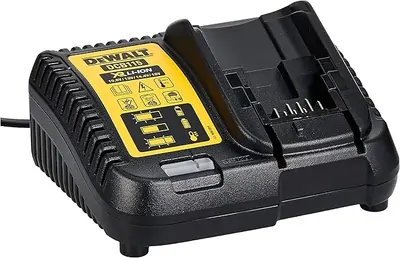
Hopefully this has helped you understand how to understand the various lights on the DCB113 battery charger. I have used this charger for around 3 years and it works really well. It is in my opinion an affordable basic charger.
When examining any charger, always consult the DeWalt manual for your specific model and error codes. When in doubt about battery safety, consult an authorised DeWalt service centre.