
If you are buying a cordless drill/driver, one feature you should know about is “torque.” Torque is one of the most misunderstood features on a cordless drill.
Whether you’re driving screws or drilling into tough materials, knowing how torque works can help you avoid stripped screws, split wood, and wasted effort.
What Is Torque?
Torque is the twisting force that a drill applies when turning a screw or bit.
- Low torque = gentle force for small screws or soft materials
- High torque = strong force for large screws or dense materials
Think of torque like muscle power—more torque means more turning strength.
Identifying Torque Settings on a Cordless Drill
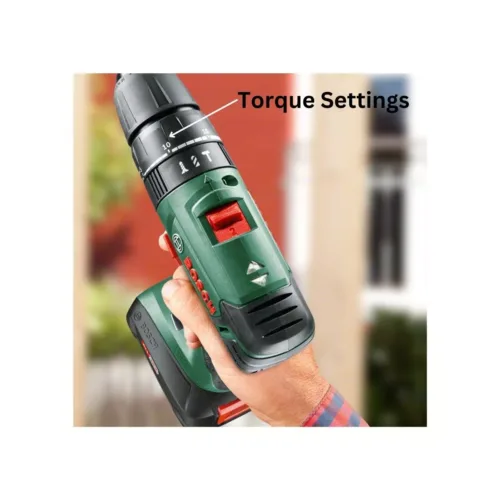
Have a look at the image below that shows where you will find torque settings on your cordless drill. These are always numbers and the amount of numbers refers to the number of torque settings available on your drill.
These will vary depending on the brand and the particular model. A popular number is 15 torque settings. They can go as high as 28 settings.
The torque is usually selected by rotating a wheel around to the torque setting you want to use.

Additionally, you will also see markings for using your drill/driver as a drill. If your drill also has a hammer function, you will see a small hammer symbol. The hammer function is only used for drilling through masonry such as brick, block, concrete etc.
You can see those settings in the image above. Quite often the torque settings and these symbols are all on the same wheel which you can then rotate into the required position.
Torque, Speed, Gears on a Cordless Drill/Driver?
These terms can get really confusing so check out our explanations below:
Feature | What It Does | Best For |
|---|---|---|
Torque | Twisting force | Driving screws, resisting load |
Speed | How fast the drill spins | Drilling holes |
Gears | Controls torque/speed balance | Gear 1 – high torque, Gear 2 – high speed |
Use Gear 1 for screwdriving, Gear 2 for drilling.
Torque: – torque is best explained as the strength of the turning or twisting force. Small numbers means a light torque and the larger numbers are heavier torques. Light torques are used for smaller screws and for driving screws into softer woods.
Higher torques are for driving larger screws (3″ or 75mm) or for screwing into harder woods such as mahogany. Torque is also referred to by some manufacturers as the “clutch.” The clutch should slip when the torque on the screw gets too high, stopping the drill head from turning
Speed – this can get really confusing for many buyers. You will see terms such as no load speed, variable speed and trigger speeds. No load speed is simply the speed the drill turns at when not being used to do anything.
Manufacturers use this as a benchmark and means very little to the user. Variable speed and trigger speed are the same thing. Think about the trigger as being the accelerator in your car. The harder you push this the faster the drill will spin.
Gears – On some drills there is the option of gears. These effect speed and torque. Most will have 2 gears. In position 1 the drill will spin more slowly and have the most torque (best for driving screws). In position 2 will spin faster but with less torque so better for drilling holes.
How to Choose the Right Torque for Your Project
Task | Recommended Torque Setting |
|---|---|
Assembling Furniture | 3-6 |
Hanging shelves | 8-12 |
Drilling into hardwood | 15+ |
Driving Long Screws | 18+ |
The torque that you select depends on what type of job you are doing. A huge mistake made by many beginners is setting their drill/driver on the highest torque and just leaving it there. The entire purpose of having torque options is to find the right setting.
- Torque too high – this can cause what is known as over driving, where the screw can get pushed too far through the wood and in some cases split the wood. For example, if you are drilling a 25mm screw into soft wood the torque should be set at between 1-3. If you use a 15 torque it would push the screw deep into the wood
- Torque too low – The reverse problem is not enough torque which places stress on your drill/driver and doesn’t put the screw in very far without jamming. For example, if you were drilling a 75mm screw into hard wood, the torque needs to be around 12-15.
The best way to find the right torque is to start low and work your way up on a scrap piece of wood. That way you can find the perfect torque very quickly without damaging your main job.
Benefits of using the right torque
Using the right torque has key benefits:
- You are using your drill/driver properly without under or over working the motor, meaning it will last longer
- You are getting better use of your battery
- You are not damaging the material you are drilling into
- You are not stripping screw heads
Cordless Drill Torque Chart
Torque Setting | Use |
|---|---|
1-4 | Best for driving in small screws in all wood types |
5-8 | Ideal for driving screws into soft woods |
9-12 | For driving smaller screws into soft and hard materials |
13-16 | For driving screws into hard wood |
17-23 | For driving large screws |
If you have to regularly drive larger screws into wood, it would be better to use an impact driver for that. Think of projects like building a deck, or installing a fence. In these types of project, you will be using longer screws (75-100mm) regularly. An impact driver has a lot more torque than a drill/driver and will do the job faster and better.
Torque isn’t just a number—it’s a control system that helps you work smarter. By adjusting torque settings based on your task, you’ll get cleaner results, protect your materials, and extend the life of your drill.
About the Author
Want to learn more about cordless drills? Check out: