
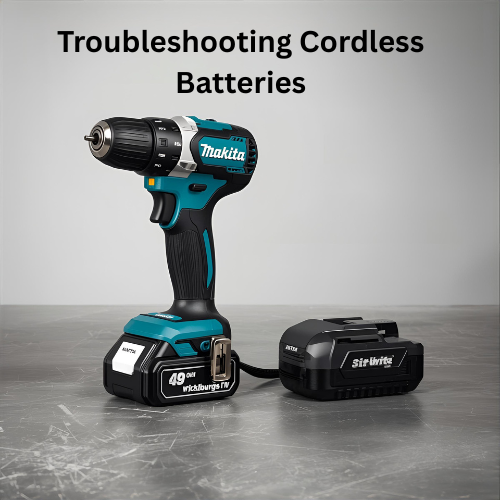
For the modern tradesman or dedicated DIYer, the freedom of cordless power is the most common choice. But that freedom comes with a significant financial cost which is the lithium-ion battery pack.
Often representing the most expensive single component in your kit, a battery failure feels like wasted money, especially when the pack seems perfectly fine one day and refuses to charge the next.
The frustration is understandable, but the solution often lies not in replacement, but in diagnosis. Most battery issues are either fixable or, at the very least, preventable.
That is if you understand the basics of lithium-ion chemistry and the role of the integrated Battery Management System (BMS). The BMS is the computer inside your battery that monitors voltage, temperature, and cell balance; when it detects a risk, it can shut the pack down—sometimes permanently.
This guide provides clear, step by step diagnostic and troubleshooting instructions to help you revive a seemingly “dead” pack, extend the lifespan of your healthy packs, and ultimately maximize the return on your entire cordless investment.
Don’t toss that expensive battery yet!
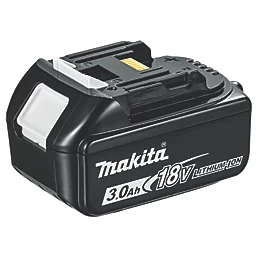
The Core Enemies of Lithium-Ion Longevity
Lithium-ion batteries are robust, but they are also sensitive to specific environmental and usage factors. Their lifespan (measured in charge cycles) is dramatically shortened by three primary enemies. Understanding these is the first step in prevention.
Heat: The Catalyst for Catastrophe
Heat is the absolute worst enemy of a lithium-ion cell, leading to accelerated chemical degradation. There are two critical periods when heat damage occurs:
- During Use: Heavy-demand tasks (like high-torque drilling or continuous grinding) generate high temperatures inside the battery pack.
- During Charging: High-speed charging is often necessary, but it generates heat. If you place a hot battery (just removed from a tool) onto a charger, the combined heat severely stresses the internal components.
When the internal temperature exceeds a safe threshold (typically around 45° or 50°), the cells degrade exponentially. Modern smart chargers will refuse to charge a hot battery, often showing a Solid Red or Orange fault code, forcing you to wait for passive cooling. Never try to bypass this safety feature.
Deep Discharge: The Permanent Lockout
Unlike older Nickel-Cadmium (NiCad) batteries, lithium-ion packs do not suffer from the “memory effect,” but they are sensitive to being fully depleted. Every Li-ion cell has a minimum safe voltage (typically around 2.5V to 3.0V per cell).
If the pack’s overall voltage drops below a critical minimum (often called Zero Voltage), the BMS will interpret this as a catastrophic risk.
When a battery is completely drained and then left sitting for a few days, the voltage can drop too low. The BMS then permanently locks the pack out to prevent it from overheating or catching fire if it were to be charged.
The smart charger will refuse to recognise the pack because the BMS won’t respond, effectively turning your expensive pack into a paperweight. This is the primary reason why batteries “die” when left unused for months.
Physical Damage and Vibration
Cordless tools are used in rugged environments, but repeated physical abuse takes a toll.
- Internal Welds: Lithium packs are made of many smaller cells connected by tiny metal tabs or welds. Repeated high-impact drops (especially onto concrete) can fracture these fragile welds, breaking the circuit and causing the pack to fail intermittently or permanently.
- Case Damage: Look for cracked plastic housing, especially near the contact terminals. Damaged housing compromises the pack’s protection against dust and moisture, leading to internal short-circuits.
Step-by-Step Diagnosis: Reading the Fault Codes
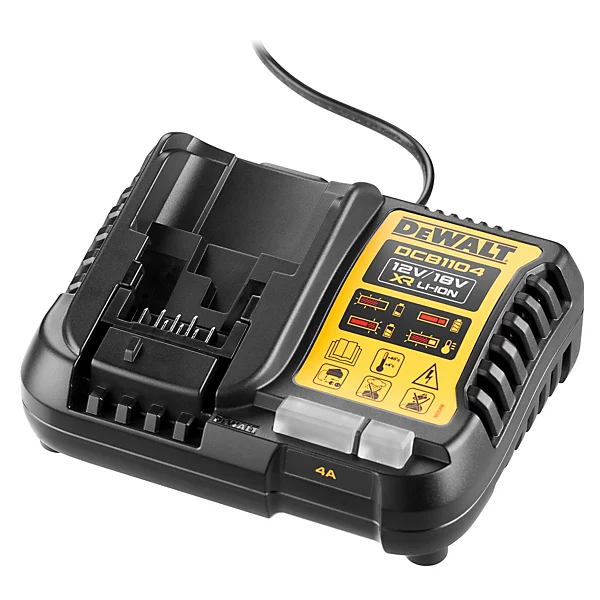
Before you assume the battery is dead, you must communicate with the charger and the battery’s BMS. Most major brands (Makita, DeWalt, Milwaukee) use a similar, universal system of LED lights to convey the status of the pack.
Error Code Chart (Generic)
Use this chart as a first step in diagnosis. Remember that the exact color and flash rate may vary by brand, but the meaning is almost always related to temperature or cell health.
Led Pattern | Common Interpretation | Recommended action |
|---|---|---|
Solid Red/Orange | Battery Too Hot or Too Cold. | Remove the battery from the charger. Allow it to rest at room temperature (20°) for 30 minutes before trying again. |
Flashing Red/Green | Battery Damaged/Faulty | This often means the pack voltage is too low (deep discharge) or there is an internal cell fault. |
Rapid Green Flash | Standby or Quick Charge Complete. | Check the charger’s manual. If it’s not charging, check terminal contacts. |
Slow Red/Green Pulse | Normal Charging. | This indicates a healthy charge cycle is underway. |
Terminal and Connection Check
A dirty connection can mimic a dead battery, preventing communication between the charger and the BMS.
- Inspect Terminals: Disconnect the charger from the wall. Visually inspect the metal contacts on both the battery and the charger port. Look for corrosion (green or white powdery residue), debris (dust, metal shavings), or bent/broken pins.
- Clean Contacts: Use a pencil eraser to gently rub the metal contacts on the battery pack, as the rubber will clean off light oxidation without scratching. Alternatively, use a cotton swab lightly dampened with isopropyl alcohol to clean the contacts, ensuring they are completely dry before reconnecting.
- Test the Charger: If you have another battery that charges normally on the same unit, the charger is fine, and the problem is confirmed to be the faulty pack.
Advanced Troubleshooting: The “Why” and “How to Fix”
These steps move beyond simple external checks and address the core issues that trigger BMS shutdowns.
A. The Battery Won’t Charge (The Dead Pack)
The Issue: BMS Lockout due to Deep Discharge.This is the most common “sudden death” failure. The pack’s voltage is too low for the smart charger to safely initiate the charging sequence, so the BMS shuts down to prevent thermal hazards. The charger can’t “see” the pack.
The Action: Attempting the “Trickle Charge” Technique
WARNING: This is an advanced, last-resort technique that carries a slight risk and should ONLY be attempted if you are prepared to retire the battery. Never attempt this if the battery is swollen or physically damaged.
The goal is to raise the pack’s voltage just enough so the smart charger recognizes it.
- Use a Donor Pack: Take a healthy battery pack (the same voltage, e.g., 18V) and a set of jump leads or heavy-gauge wire.
- Momentary Connection: Very briefly touch the positive terminal of the dead pack to the positive terminal of the healthy pack, and the negative to the negative (observing polarity is critical). Hold for no more than 1 to 2 seconds. This provides a tiny surge of current.
- Immediate Charge: Immediately place the “shocked” pack back onto the smart charger. If the voltage has been raised just above the lockout threshold, the charger should recognize it and begin the slow charging sequence. If not, the battery is likely irretrievable.
B. Rapid Draining (Premature Death)
The Issue: Cell Imbalance or Failure.
A lithium-ion pack contains multiple cells wired in series. If just one cell degrades faster than the others, the entire pack’s voltage balance is thrown off.
The weak cell drops in voltage quickly, forcing the BMS to shut the entire pack down prematurely, making it seem like the battery is dead even though it still has residual charge.
The Action: Isolate the Failure.
- Mark and Re-purpose: If a pack drains rapidly, mark it clearly. Advise users to dedicate this pack to lower-draw tools (like fans, lights, or radios) that don’t demand high current. The reduced draw means the weak cell is stressed less, allowing you to use more of the remaining power before the BMS triggers the shutdown.
- Tool vs. Battery Test: To rule out a faulty tool: Test the rapidly draining pack in a different tool of the same type. If the pack drains rapidly in both tools, the problem is confirmed to be the battery. If it drains rapidly in only one tool, that tool’s motor is likely drawing excessive current due to an internal fault.
Prevention is Key: Storage and Charging Best Practices
Proactive habits are the only foolproof way to ensure battery longevity and avoid the need for troubleshooting altogether.
The 50% Storage Rule
Li-ion batteries degrade least when they are stored at a mid-range State of Charge (SoC), ideally between 50% and 70%. If you know a pack will be unused for several weeks or months, deliberately charge or discharge it to this range.
Storing a battery at 100% charge for long periods significantly stresses the cells and accelerates capacity loss.
Temperature Control is Everything
Maintain a stable, moderate environment for both charging and storage.
- Optimal Range: The sweet spot is between 10° and 25°C.
- Never: Leave packs on window ledges (sunlight), near radiators, or overnight in freezing vehicles. Cold temperatures temporarily reduce performance, but extreme heat causes permanent, irreversible damage.
Smart Charger Discipline
- Always use the manufacturer-matched smart charger. These chargers communicate with the BMS to manage cooling and charging rate. Generic chargers lack the necessary protocol controls and can severely damage or destroy expensive packs.
- Finally, never attempt to charge a visibly damaged, swollen, or punctured pack. Swelling is a sign of internal failure and a severe thermal hazard. If a pack is swollen, safely dispose of it according to local battery recycling guidelines.
Physical Inspection and Warranty Checks
Before discarding a pack, perform a final physical and functional check.
4.1 Terminal and Housing Inspection
- Check for Swelling: Any visible bulging or swelling of the plastic casing is a severe sign of dangerous internal cell failure and off-gassing. Immediately retire this battery safely. Do not attempt to charge or use it.
- Check the Pins: Ensure all metal contacts (pins) on the battery are clean, straight, and spring-loaded. A bent or recessed pin can prevent proper contact and communication with the tool or charger, mimicking a battery failure.
4.2 Warranty Check
Most professional 18V batteries (e.g., Makita LXT, DeWalt XR) come with a 1-year or 2-year limited warranty (depending on the brand and retailer).
If your pack failed early due to what appears to be a manufacturer’s defect (not physical damage), ensure you check the registration date against the warranty period before buying a replacement.
Summary
By understanding the lithium-ion cell’s enemies which are heat, deep discharge, and physical shock, you gain control over the most expensive aspect of your cordless ecosystem.
Proactive measures, like respecting temperature limits and storing batteries at mid-charge, are the best defense against premature failure. Knowing how to read those simple LED fault codes will save you time and prevent you from tossing a perfectly viable pack.
If you’ve successfully saved a pack from the grave, congratulations! Now, ensure the rest of your kit is just as well maintained by mastering the full scope of safety and maintenance.
Conclusion CTA: If you’re ready to master every aspect of your professional kit, from avoiding kickback to maintaining motor health, return to the ultimate resource for safety and maintenance:
The Essential Guide to Power Tool Safety, Care, and Long-Term Maintenance.