
The cordless drill is in our experience, the most essential tool in any DIYer’s tool kit. I also understand that if you’re new to the world of home improvement, it can feel a bit intimidating to pick one up for the first time.
This comprehensive guide is designed specifically for beginners in the UK. We break down everything you need to know to confidently and safely use your cordless drill.
By the end of this article, you’ll understand the different parts of a drill, how to choose the right drill and screwdriving bits, and how to drill holes and drive screws like an experienced DIYer.

Expert Verdict: “Using a drill isn’t just about pulling the trigger. I’ve seen plenty of beginners burn out motors or strip screw heads because they didn’t know how to set the ‘gears’ or the ‘clutch.’ Once you master these three settings, you’ll go from ‘guessing’ to drilling with total precision.”
Key Components Explained
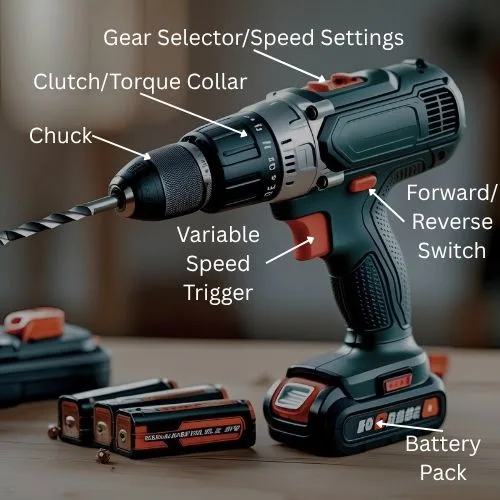
To use your cordless drill to its full use, it is important to know its main parts and what they do. We have included a diagram just below that show the main parts of a cordless drill.
Note: Depending on the model some features may not exist such as gear selector.
1. Mastering the Mode Selector (The Icons)
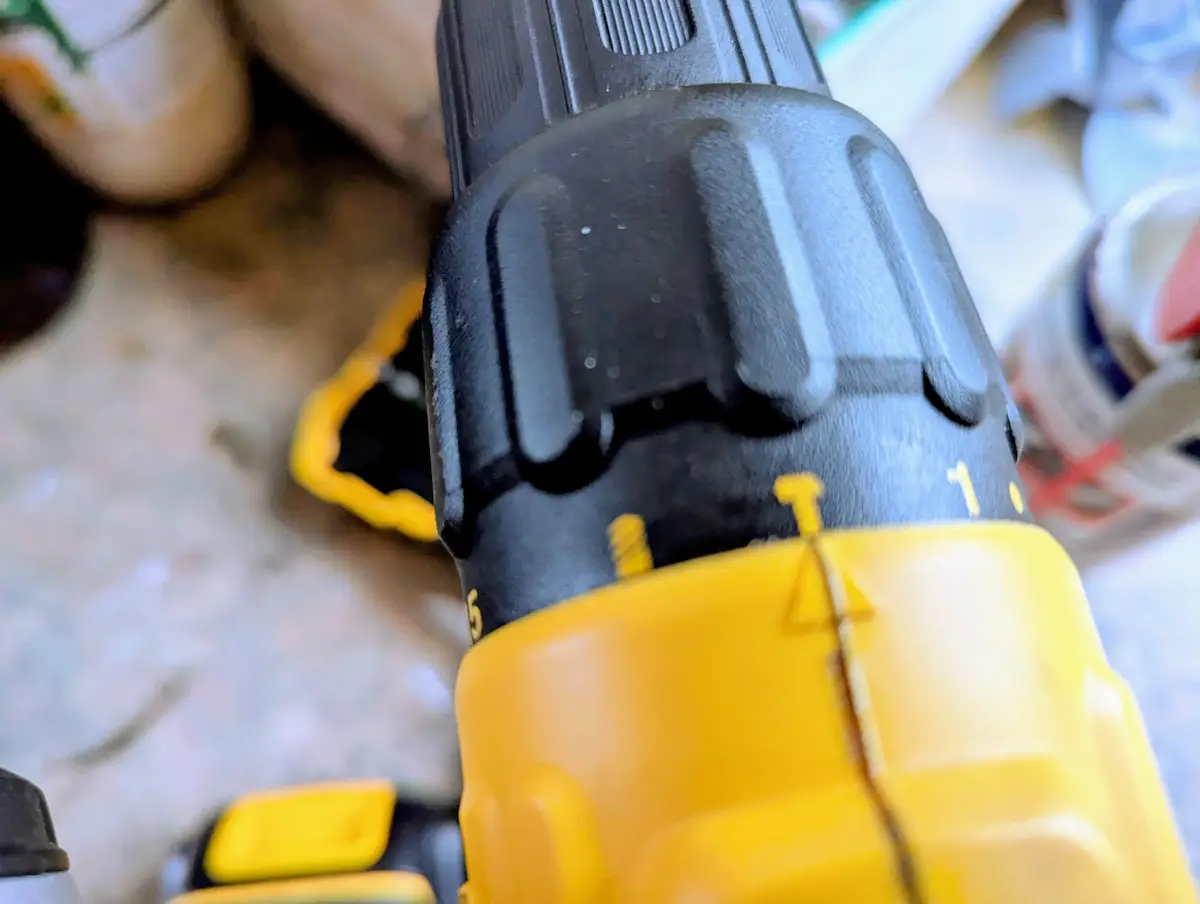
You can see the various icons on my DCD776 cordless drill I use for DIY
Most UK “Combi” drills (like the Bosch or Makita we discussed) have three distinct modes. You need to click the ring to the right icon for the job:
- Screw Icon (Drive Mode): This engages the Clutch. Use this for putting in screws. It prevents the drill from over-tightening. This is usually a set of numbers on the wheel.
- Drill Bit Icon (Drilling Mode): This locks the clutch. Use this for boring holes into wood, metal, or plastic.
- Hammer Icon (Hammer Mode): Use this ONLY for drilling into brick, stone, or concrete. It adds a “pulsing” action to help the bit smash through masonry.
Enda’s Veteran Tip: Never use Hammer Mode on wood or plastic. It won’t make the job faster; it will just splinter your material and blunt your drill bit. If you’re not hitting brick, keep the hammer off.
2. The Mystery of the Clutch (The Numbers)
That numbered ring (usually 1–20) is the most misunderstood part of a drill. It’s a “Torque Limiter.”
- Low Numbers (1–5): Very little power. Use these for small screws in delicate materials like flat-pack furniture or MDF. If the drill starts clicking and stops turning, the clutch is doing its job, as it’s protecting the wood!
- High Numbers (10–20): High power. Use these for long screws or harder timber like oak.
- The “Clicking” Sound: If the drill clicks but the screw isn’t deep enough, turn the number up.
3. High Speed vs. High Torque (The “1” and “2” Switch)
Almost every cordless drill has a slider on the top labelled 1 and 2. Think of this like the gears in your car:
- Gear 1 (Low Speed / High Torque): Like first gear. It’s slow but has massive pushing power. Use this for driving screws.
- Gear 2 (High Speed / Low Torque): Like fifth gear. It spins very fast. Use this for drilling holes.
4. How to Change a Bit (The “Click” Trick)
Most modern drills have a Keyless Chuck. You don’t need a tool to tighten it.
- Open the jaws by twisting the front collar anti-clockwise.
- Drop your bit in.
- Twist clockwise until it’s tight.
- Enda’s Pro Tip: Once it’s tight, give it one final “click” clockwise. You’ll often hear a mechanical “ratchet” sound and that’s the chuck locking the bit so it doesn’t spin loose mid-job.
5. Avoiding the “Stripped Screw” Nightmare
A “stripped” screw is when the head gets chewed up and the drill can no longer grip it.
- Stay Square: Your drill must be 100% in line with the screw. If you’re at an angle, you’ll slip and ruin the head.
- Lean Into It: Don’t be afraid to put some body weight behind the drill. This keeps the bit pressed firmly into the screw.
- Start Slow: Gently squeeze the trigger to get the screw started, then speed up once it’s bitten into the wood.
“Before you pull the trigger, make sure you’ve matched your bit to your wall plug. You can find the exact measurements in my [UK Drill Bit Size & Wall Plug Chart].”
Other Features Worth A Mention
Forward/Reverse Switch
What it does?
This small switch, typically located above the trigger, controls the direction of the chuck’s rotation.
For driving in vs. removing:
- Forward (usually pushing the switch left): This rotates the chuck clockwise, and is used for drilling holes and driving screws in.
- Reverse (usually pushing or pulling the switch right): This rotates the chuck counter-clockwise, and is used for removing screws or backing a drill bit out of a hole.
- Middle Position: Often acts as a trigger lock, preventing accidental activation. Always set it to the middle when changing bits or storing the drill.
Trigger & Variable Speed
What it does?
The main trigger is what you squeeze to make the drill operate. Almost every cordless drill has a “variable speed” trigger.
How pressure controls speed
This means the harder you squeeze the trigger, the faster the chuck spins. This allows for precise control, letting you start slowly for accuracy and then increase speed as needed.
Battery Pack
Importance of charging
This detachable unit powers the drill. Always ensure your battery is fully charged before starting a project to avoid interruptions.
Battery types (Li-ion)
Most modern cordless drills use Lithium-Ion (Li-ion) batteries, which are lightweight, hold a charge well, and don’t suffer from a “memory effect.” That simply means you can charge them whenever you want without damaging their capacity. Older or really cheap drill may use the old NiCad batteries which suffered from memory effect.
Safety First: Essential Precautions
Working with any power tool, even something as common as a cordless drill, requires careful attention to safety. Following the precautions shown below will help prevent accidents and ensure a safer DIY experience.
Personal Protective Equipment (PPE)
- Eye Protection: In our opinion, this is non-negotiable. Flying debris (wood chips, metal shavings, dust) can cause serious eye injuries. Always wear safety glasses or goggles that meet safety standards.
- Hearing Protection (for extended use or loud tasks): While drills aren’t always as loud as saws, prolonged exposure to noise can damage your hearing. Consider earplugs or earmuffs, especially for longer drilling sessions or when working with harder materials.
- Gloves (when handling materials, but be cautious around rotating parts): Gloves can protect your hands from splinters or rough materials. However, never wear loose-fitting gloves when operating the drill, as they can get caught in the rotating chuck or bit, pulling your hand in. If you wear gloves, ensure they are snug-fitting.
Workpiece Security
This is one of the most critical safety tips. Never hold a piece of material by hand while drilling or driving.
The drill bit can bind, or the screw can get stuck, causing the material to spin unexpectedly or your hand to slip, leading to injury. (This is known as “kickback”)
Use clamps, a vice, or a stable workbench to secure your material firmly.
Clear Work Area
Before you start any drilling or driving, take a moment to clear your workspace.
Remove any tools, cords, or clutter that could trip you or interfere with your movement. Ensure you have stable footing and aren’t working on a slippery surface.
Proper Grip & Stance
- Hold the drill firmly with both hands whenever possible, especially for drilling. Try to maintain a balanced stance with your feet shoulder-width apart. This provides maximum control and reduces the risk of the drill twisting out of your hands if it binds.
- Avoid overreaching – Don’t stretch too far to reach your drilling spot. Reposition yourself or your workpiece instead.
Loose Clothing/Hair/Jewellery
Loose clothing, long hair, or dangling jewelry can easily get caught in the rotating chuck or drill bit, pulling you towards the tool and causing serious injury.
Tie back long hair, secure loose clothing, and remove any jewellery before using the drill.
Enda’s Safety Check:“Before you start, check what’s behind the wall! A cheap stud finder is worth its weight in gold to avoid hitting a water pipe or a live electrical wire. In a UK house, those wires usually run vertically or horizontally from a socket, so be extra careful in those areas.”